
Terminal Record v2
Purpose
The Terminal Record v2 allows you to view and filter payment transaction records based on Operator, Payment Method, Channel, Date Range, and Outlet.
You can also select multiple channels in a single report.
Filter Function
The following filters are available for generating the report:
How to Access Terminal Record v2
Follow these steps to open the report:
Laundro Portal → Report → Terminal Record v2
Step 1: Log in to Laundro Portal
Log in to the Laundro Portal using your Username and Password.
Step 2: Open the Report Menu
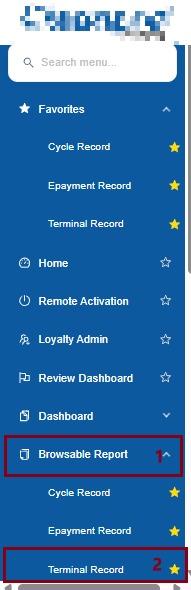
Step 3: Select Terminal Record v2
Under the Report menu, click Terminal Record v2.
You will be directed to the Terminal Record v2 page.
How to Generate the Report
Once you are on the Terminal Record v2 page, use the available filters to select the information you want to view.
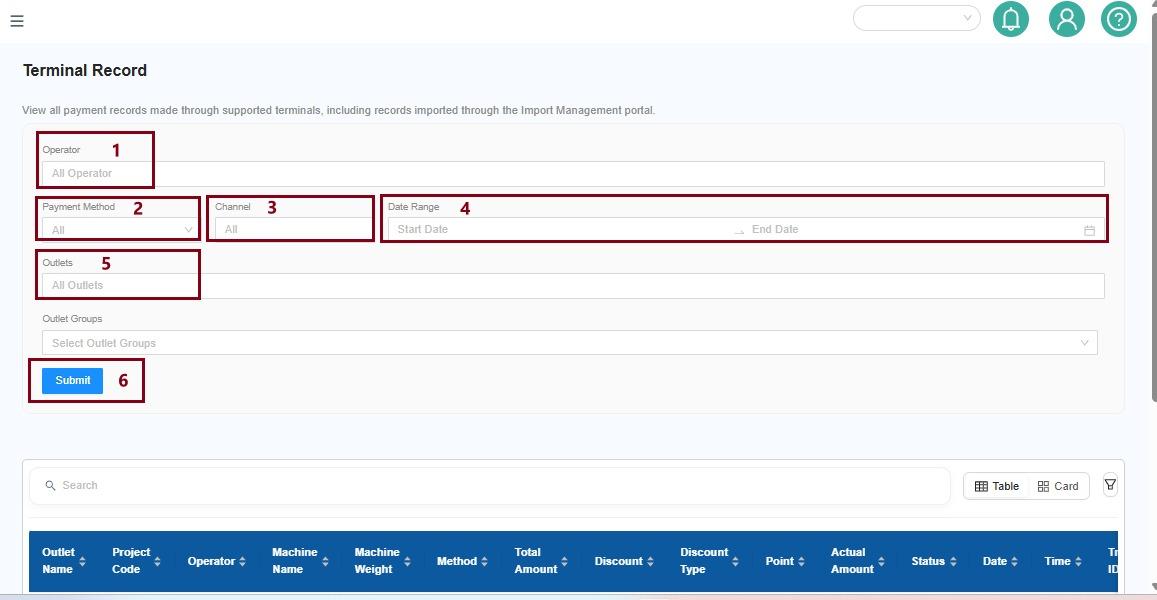
Step 1: Select Operator
Select the Operator you want to include in the report.
If you want to view transactions from all operators, select All Operator.
Step 2: Select Payment Method
Select the Payment Method you want to view.
Step 3: Select Channel
Select the Channel you want to include in the report.
You can select one or multiple channels.
Example:
Select Channel A + Channel B to view transactions from both channels in the same report.
Step 4: Select Date Range
Select the Date Range for the transactions you want to view.
For example:
1 September 2026 – 30 September 2026
Step 5: Select Outlet
Select the Outlet you want to view.
If you want to include all outlets, select All Outlet.
Step 6: Submit
After selecting all the required filters, click Submit.
The system will generate the report based on your selected filters.
Example
To view all online payment transactions from two channels at one outlet:
| Filter | Selection |
|---|---|
Operator | All Operator |
Payment Method | Online Payment |
Channel | Channel A + Channel B |
Date Range | 1 – 30 September 2026 |
Outlet | Outlet A |
After selecting the filters, click Submit.
The system will display the transaction records that match your selections.
Important Note
You can select multiple channels when generating the report. This allows you to view transactions from different channels together without generating a separate report for each channel.
Quick Navigation
Laundro Portal
↓
Report
↓
Terminal Record v2
↓
Select Filters
↓
Submit
↓
View Transaction Records
No comments to display
No comments to display