
🔄 How to Reset Alpha-1 for a New Outlet
🛠️ Preparing an Alpha-1 device for a new outlet? Follow this guide to perform a factory reset and prepare the device for its next setup.
🎯 Purpose
This guide explains how to:
- 🔧 Access the Alpha-1 device.
- 🔄 Perform a factory reset.
- 💡 Identify the reset status using the LED indicators.
- 📶 Confirm that the device enters AP mode.
🧭 Quick Navigation
- 🛑 Prepare the Device
- 🔧 Open the Alpha-1 Casing
- ⚡ Power On the Device
- 🔄 Perform a Factory Reset
- 💡 Check the LED Indicators
- 📶 Confirm AP Mod
🛑 Step 1: Prepare the Device
Before starting, make sure you have:
- 🪛 A Philips-head screwdriver (PH1).
- 🔌 Access to the Alpha-1 power supply.
- 📘 The correct factory-reset instructions for your Alpha-1 model.
⚠️ Safety Reminder: Disconnect the power before opening the casing. Do not touch exposed electrical connections while the device is powered. Only restore power when it is safe to do so and according to the approved procedure.
🔧 Step 2: Open the Alpha-1 Casing
- Make sure the power supply is disconnected.
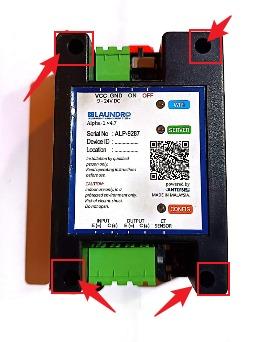
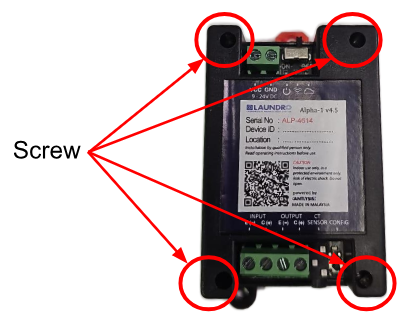
- Use a Philips-head screwdriver (PH1) to unscrew the four screws.
- Carefully open the casing to access the internal components.
💡 Tip: Keep the screws in a safe place so they can be reinstalled later.
⚡ Step 3: Power On the Alpha-1
Once the casing has been opened safely, restore the power supply according to the approved reset procedure.
⚠️ Important: Avoid touching exposed electrical components while power is connected.
🔄 Step 4: Perform a Factory Reset
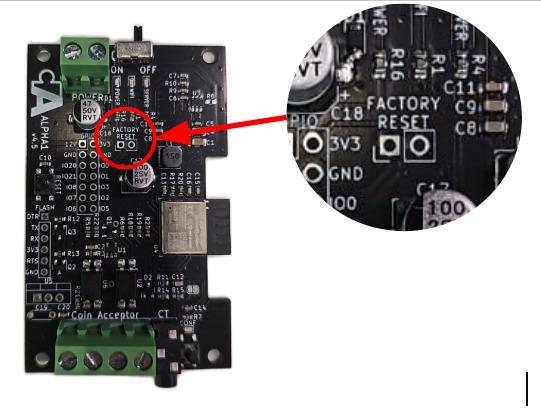
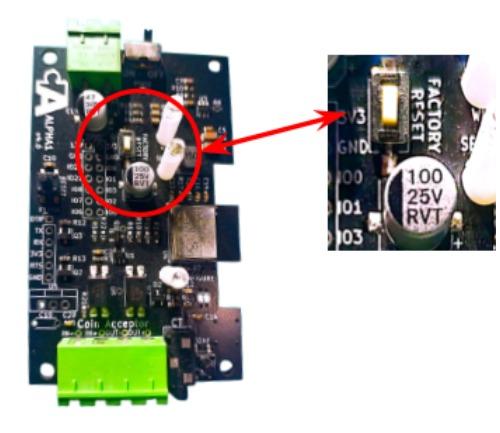
- Locate the designated Factory Reset button or reset points.
- Follow the approved reset method for your Alpha-1 model.
- Complete the reset action as instructed.
⚠️ Important: The original guide mentions both shorting two points and long-pressing Factory Reset. Confirm the correct method for your device before proceeding. Do not short unidentified pins.
💡 Step 5: Check the LED Indicators
After performing the reset, observe the Alpha-1 LED indicators.
✅ Expected result: All LEDs blink once to indicate that the device has been reset.
💡 Troubleshooting Tip: If the LEDs do not blink as expected, check the reset procedure and power connection before trying again.
📶 Step 6: Confirm AP Mode
After the factory reset, the Alpha-1 should enter AP mode.
AP mode allows the device to be accessed for the next setup process.
✅ Expected result: The Alpha-1 enters AP mode and is ready for the next configuration step.
✅ Final Checklist
Before closing the casing or proceeding with the new outlet setup, confirm:
- ☐ The factory reset was completed.
- ☐ All LEDs blinked once as expected.
- ☐ The Alpha-1 entered AP mode.
- ☐ The device is ready for the next configuration step.
- ☐ The casing is securely closed when it is safe to do so.
🎉 Reset Completed!
The Alpha-1 is ready for the next setup stage once the factory reset is successful and AP mode has been confirmed.
➡️ Next Step: Continue with the approved Alpha-1 setup procedure for the new outlet.
No comments to display
No comments to display