
Outlet Group
Outlet Group
OverviewWhat is Outlet Group?
Outlet Group isallows ayou standardizedto filtering feature for all reports.
When handlingsave multiple operators and outlets, users may need to include or exclude specific operators or outlets fromas a report.group.
Once Groupyou allows users to savecreate a predefinedgroup, combinationyou ofcan use it in different reports without selecting the same operators and outlets and reuse it across different reports.again.
Create
Example
If you regularly generate reports for:
AnYou can create an Outlet Group iconcontaining willthese beoperators availableand inoutlets.
Next time, simply select the saved Outlet Group instead of selecting everything manually.
1. Create an Outlet Group
To create ana new Outlet Group:
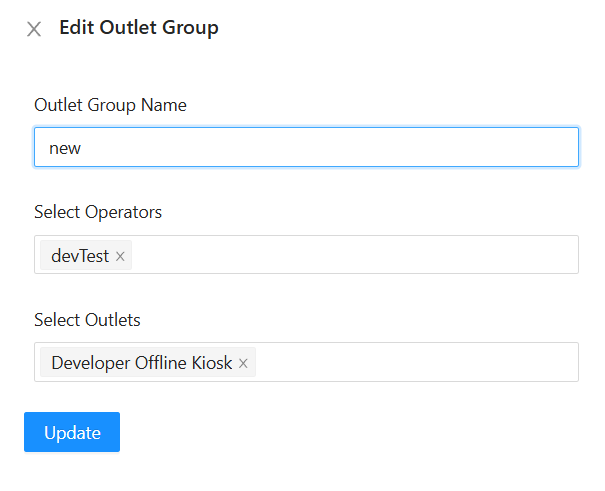
Step 1: Open Outlet Group
In the report, click the Outlet Group icon.
Step 2: Enter Group Name
Enter a name
forthattheisOutleteasyGroup.- to identify.
Example:
Klang Valley Outlets
Step 3: Select Operator
Select the
operatorsoperator(s) you want tobe includedinclude in the group. -
Step 4: Select Outlet
Select the
outletsoutlet(s) you want tobe includedinclude in the group. -
Step 5: Save the Group
Click Submit
ClickSubmitto save the Outlet Group.
Use
Your Outlet Group is now ready to use.
2. Use an Outlet Group in a Report
TheAfter creating an Outlet Group, you can use it when generating reports.
Step 1: Open the Report
Open the report you want to view.
Step 2: Select Outlet Group
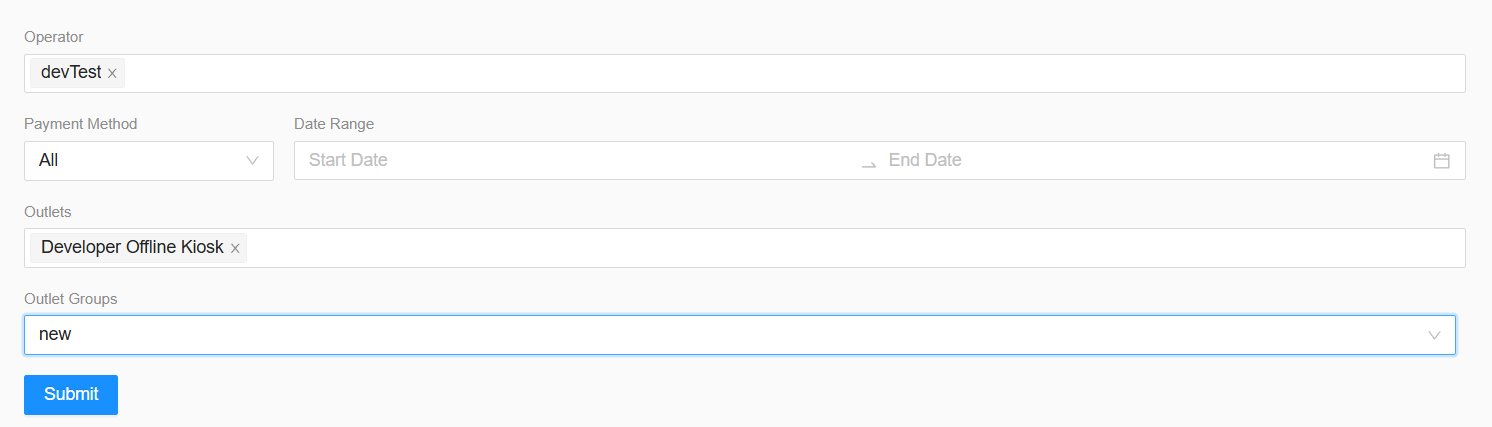
In the filter section, select the Outlet Group optionyou created earlier.
Step 3: Check the Selection
After selecting the Outlet Group, the system will beautomatically availablefill in the filtering section of all reports.related:
Select a previously created Outlet Group.
TheOperator
You do not need to select them manually.
Step 4: Generate the Report
Click Submit to generate the report.
The report will automaticallydisplay be populatedinformation based on the operators and outlets included in the selected Outlet Group.
ClickSubmitWhy Use Outlet Group?
Outlet Group saves time when you regularly work with the same outlets.
Without Outlet Group
You need to select:
Operator → Outlet → Operator → Outlet → ...
every time you generate a report.
With Outlet Group
Simply select:
Outlet Group → Submit
The system will automatically select the
reportsavedusingoperators and outlets for you.Important Note
Make sure the correct operators and outlets are selected when creating the Outlet Group.
If you need a different combination of operators or outlets, create a separate Outlet Group with a different name.
Quick Summary
Create once → Save the group → Reuse it in different reports.
This allows users to quickly apply the same operator and outlet selection across different reports without manually selecting them each time.