
Outlet Group
Outlet Group
Overview
Outlet Group is a standardized filtering feature for all reports.
When handling multiple operators and outlets, users may need to include or exclude specific operators or outlets from a report. Outlet Group allows users to save a predefined combination of operators and outlets and reuse it across different reports.
Create Outlet Group
An Outlet Group icon will be available in reports.
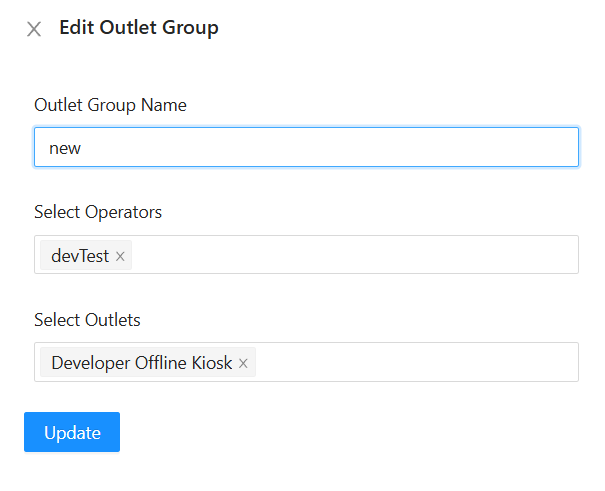
To create an Outlet Group:
-
Enter Group Name
- Enter a name for the Outlet Group.
-
Select Operator
- Select the operators to be included in the group.
-
Select Outlet
- Select the outlets to be included in the group.
-
Submit
- Click Submit to save the Outlet Group.
Use Outlet Group
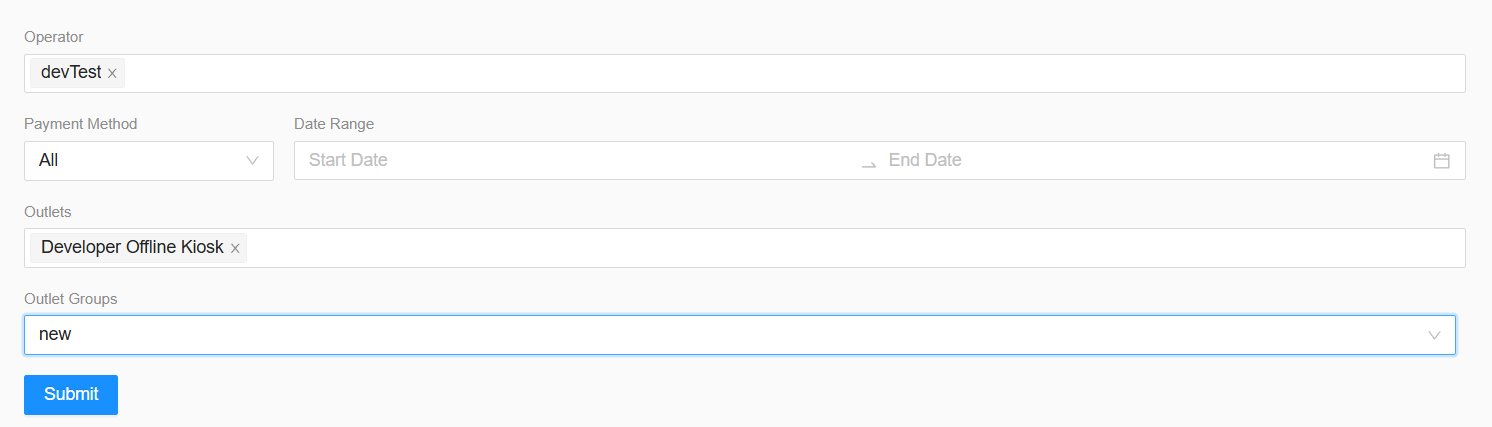
The Outlet Group option will be available in the filtering section of all reports.
-
Select Outlet Group
- Select a previously created Outlet Group.
-
Auto Select Operator and Outlet
- The Operator and Outlet fields will automatically be populated based on the selected Outlet Group.
-
Submit
- Click Submit to generate the report using the selected Outlet Group.
This allows users to quickly apply the same operator and outlet selection across different reports without manually selecting them each time.