
📩 How to Check SMS Credit
In this guide, you check how much SMS credit your operator has. SMS means Short Message Service. It is a text message that Laundro sends to a phone. It is used for member's authetication or commununication.
🎯 Purpose
Use the SMS Report to:
- 📩 Monitor SMS requests, including temporary-password requests.
- 💳 Check the remaining SMS credit balance.
- ⚠️ Identify when a top-up may be needed.
🧭 Quick Navigation
- 🔐 Log in to Laundro Portal
- ⚙️ Open Settings
- 🏪 Select Your Operator
- 📩 Open Notification Settings
- 🔍 Check Your SMS Credits
- 💳 Top Up if Needed
Before you start
Sign in to Laundro.- Use a user role that can open the Billing page. Only approved roles can open it. If you cannot open it, contact the Laundro administrator at [email protected].
Steps🔐 Step 1: Log in to Laundro Portal
Log in using your username and password.
💡 Tip: Make sure your account has the necessary permissions to access the required settings.
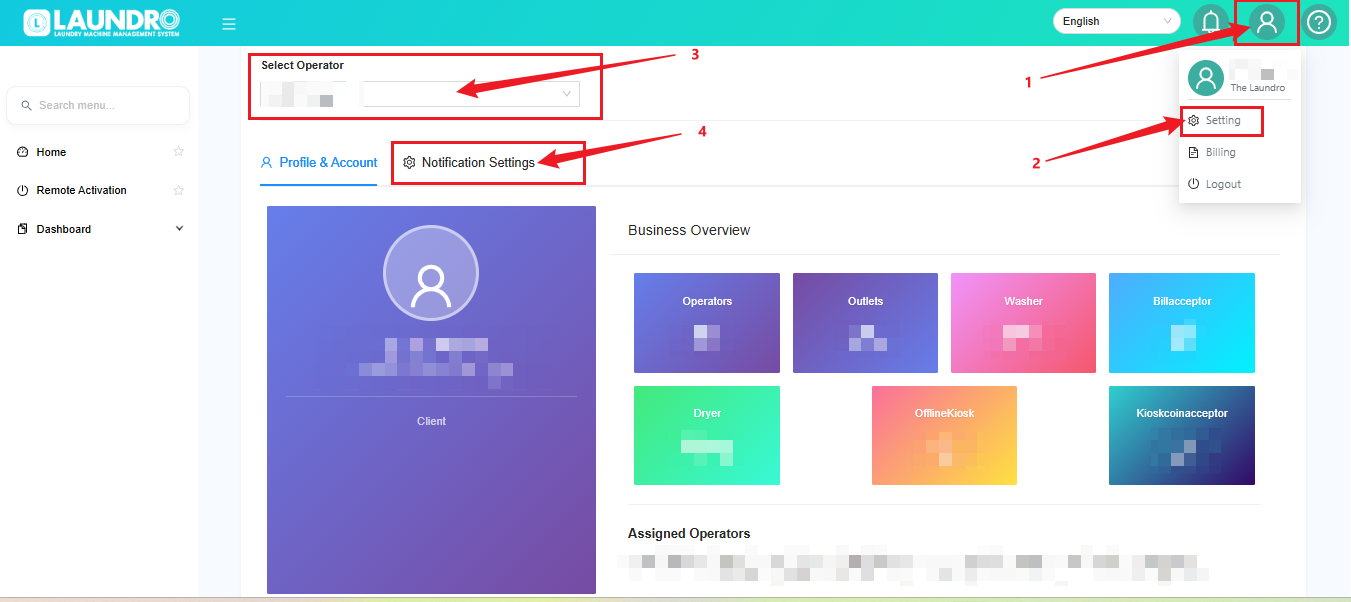
⚙️ Step 2: Open Settings
- Click the
profileProfile icon at thetoptop-rightof the screen.corner. ClickSelect Setting.Click
🏪 Step 3: Select Your Operator
3. Find the Select Operator listdropdown &list. Choose yourthe operator.
4. Click the Notification Settings tab. The page opens on Profile & Account first.
💡 Tip: Make sure you select the correct operator before checking the credit balance.
📩 Step 4: Open Notification Settings
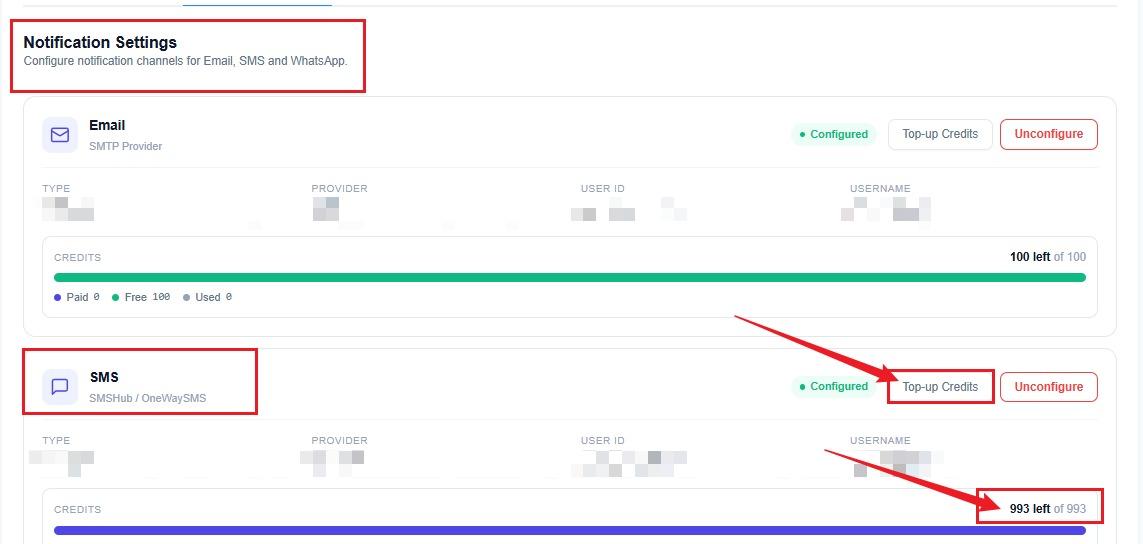
- Scroll down to locate the SMS section.
- Find the SMS section. Scroll down if you do not see it.
- Look at the CREDITS box in the SMS section.
- Read the text at the top right of the CREDITS box.
What🔍 youStep should5: seeCheck Your SMS Credits
The
- Locate the CREDITS box
showsunder the SMS section. - Look at the credit balance displayed at the top-right corner of the box.
- Check the balance to see how
muchmany credits remain.
💡 How to Understand Your SMS Credit Balance
Example: 589 left of 638
- ✅ 589 left — You have 589 SMS credits remaining.
- 📊 638 total — Your total credit
youallocationhave.is 638. - 📉 Used — Credits that have already been used.
- 💳 Paid — Credits purchased.
- 🎁 Free — Credits provided free of charge.
📌 Remember: One SMS uses one credit.
If you see⚠️ Out of
creditscredits: If this message appears in red,you have noyour SMScredit.Ifcredit balance is empty and youseemayaneednumbertowithtoptheup.words"left💳
of",Stepyou6:stillTophaveUp Your SMScredit.
For example, "589 left of 638" means that you have 589 credits left. The total is 638 credits.
The bar and the labels below the text show more details:
Paid: the credit that you paid for.Free: the credit that Laundro gives you for free.Used: the credit that you already used.
The Email section works in the same way. One email also uses one credit.
Next stepCredits
If you have norun out of SMS credit,credits:
- Go
up the SMS credit. Into the SMSsection, clicksection. - Click Top-up Credits.
- Follow
Laundrotheopensinstructions on the top-uppage.pageForto complete thestepsprocess.
➡️ Next Step: Refer to pay, readthe How To Top-up SMS Credit. guide for detailed instructions.
Terms✅ usedQuick inChecklist
Before pageleaving the page, make sure you have:
Operator:☐ Selected themaincorrectuseroperator.- ☐
ofLocated theLaundroSMSappsection. SMS☐credit:Checked thebalanceremainingthatcredityoubalance.- ☐
useConfirmed whether a top-up is needed.
🎉 You're all set! You now know how to sendcheck SMS messages