📩 How to Check SMS Credit
In this guide, you check how much SMS credit your operator has. SMS means Short Message Service. It is a text message that Laundro sends to a phone. It is used for member's authetication or commununication.
🎯 Purpose
Use the SMS Report to:
📩 Monitor SMS requests, including temporary-password requests.
💳 Check the remaining SMS credit balance.
⚠️ Identify when a top-up may be needed.
Before you start
Sign in to Laundro.
Use a user role that can open the
Billing page. Only approved roles can open it. If you cannot open it, contact the Laundro administrator at
[email protected].
Steps
Click the profile icon at the top right of the screen.
Click
Setting.
Click the
Select Operator list.
Choose your operator.
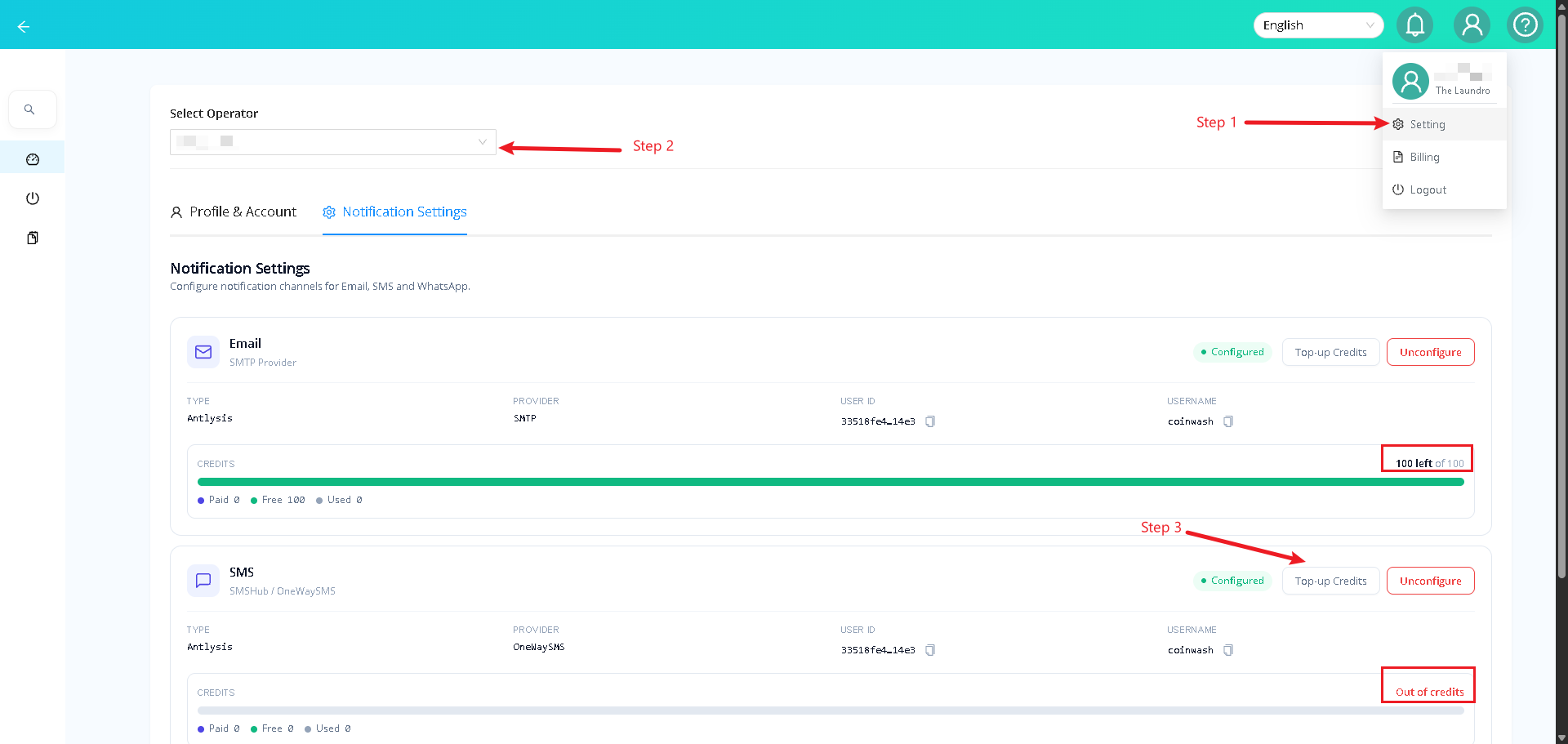
Click the
Notification Settings tab. The page opens on
Profile & Account first.
- Find the SMS section. Scroll down if you do not see it.
Look at the
CREDITS box in the
SMS section.
Read the text at the top right of the
CREDITS box.
What you should see
The CREDITS box shows how much SMS credit you have. One SMS uses one credit.
If you see
Out of credits in red, you have no SMS credit.
If you see a number with the words "left of", you still have SMS credit.
For example, "589 left of 638" means that you have 589 credits left. The total is 638 credits.
The bar and the labels below the text show more details:
Paid: the credit that you paid for.
Free: the credit that Laundro gives you for free.
Used: the credit that you already used.
The Email section works in the same way. One email also uses one credit.
Next step
If you have no SMS credit, top up the SMS credit. In the SMS section, click Top-up Credits. Laundro opens the top-up page.
For the steps to pay, read How To Top-up SMS Credit.
Terms used in this page
Operator: the main user of the Laundro app
SMS credit: the balance that you use to send SMS messages
Top up: add SMS credit
Laundro administrator: the Laundro team, who own the product and help with user roles and refunds