
Costing & Sales v2
Purpose
The Costing & Sales report allows you to view costing and sales information based on the selected Operator, Month, and Outlet.
How to Access
- Log in to the Laundro Portal using your Username and Password.
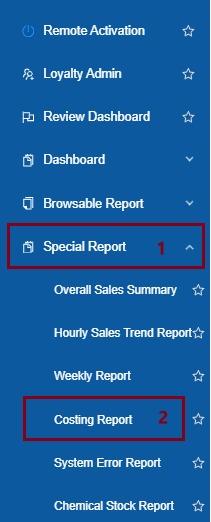
- Go to Special Report.
- Select Costing & Sales v2.
Report Filter and Report
Filter Function
Step-by-Step
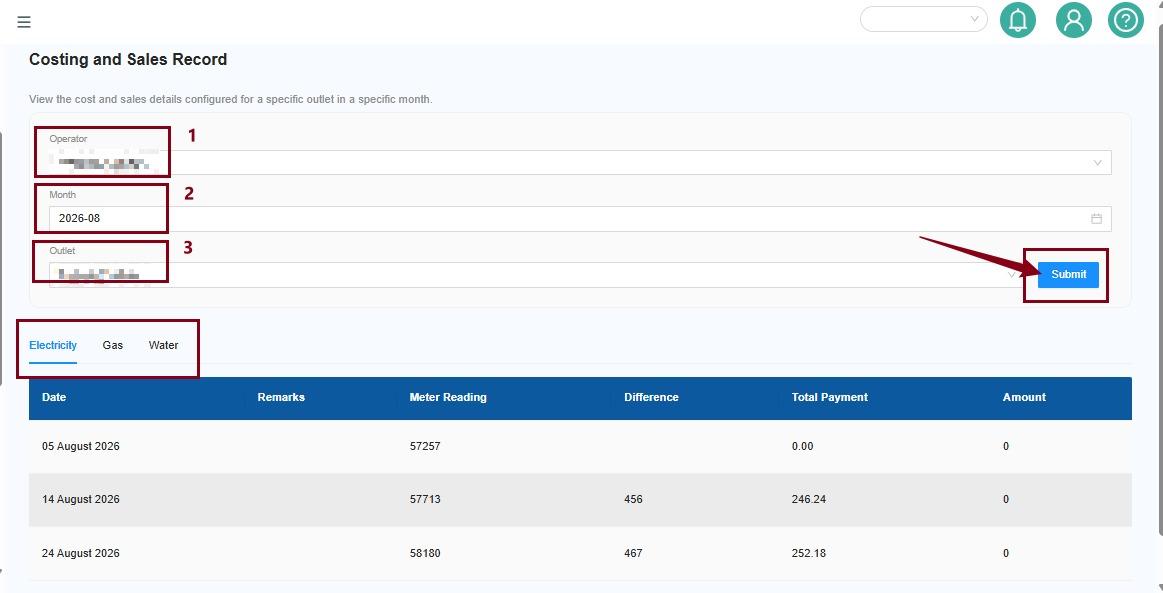
The following filters are available for generating the report:
1.
Select Operator
Select the Operator you want to view.
2.
Select MonthSelect the month for the report.
3. Select Outlet
Select the Outlet you want to view.
4. Generate the Report
After selecting all the required operator.
Select Month
Select Outlet
Submit.
The
Report
Follow the same format as the existing report.
Additionally, the report will display the Total based on the selected filters.
Report Information
The generated report will display the costing and sales information based on the selected:
- Operator
- Month
- Outlet
The report will also show the Total based on the selected filters.
Example
For example, select:
| Filter | Selection |
|---|---|
Operator | Operator A |
Month | September 2026 |
Outlet | Outlet A |
Click Submit to generate the report.
The system will display the Costing & Sales information for Operator A, Outlet A, for September 2026.
TIP : If you want to view a different operator, month, or outlet, change the filter and click Submit again to generate the updated report.
Make sure you select the correct filters before reviewing the report.