
Blue Whale - Installation
Example: Blue Whale Stack Dryer & Washer
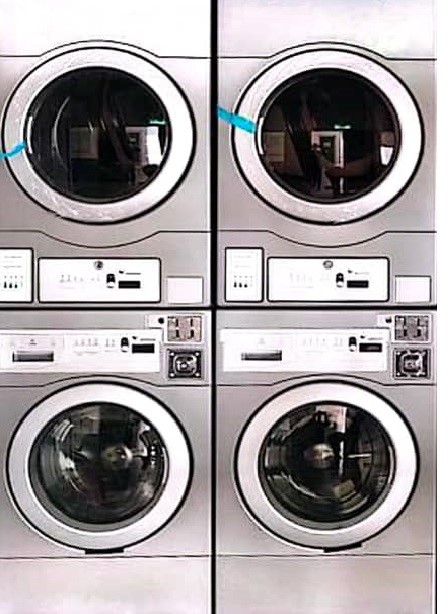
Harness(A) connectionConnection Washer/Dryer
1. Blue Whale machine, the connection is direct and simple. You will see three wires running from the board to the coin acceptor (Black, White, and Red).”
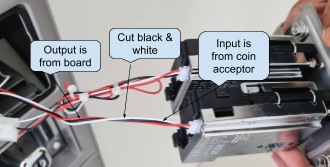
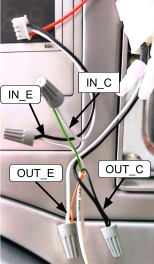
2. As shown in the picture above, cut the Black and White wires between the board and the coin acceptor. Then, connect the input and output using the 4-core wire from the device.
3. Leave Red wire
- Do not cut Red (it’s power). It should remain continuous from board.
4. Cut the Black & White wires
- Cut both Black and White roughly in the middle of their run.
5. Two sides after the cut
-
The ends coming from the board = OUTPUT (to the machine board).
-
Board-White → OUT+
-
Board-Black → OUT−
-
-
The ends going to the coin acceptor = INPUT (from the coin acceptor).
-
Acceptor-White → IN+
-
Acceptor-Black → IN−
-
6. Power ON and test
- Insert a coin/token, If the Coin Read in Node Cloud app shows pulses and the machine credit—done.
7. If it shows “No Pulse Detected”:
-
Confirm IN/OUT are not swapped.
-
Verify + and − on both input and output pairs.
-
Ensure the coin is actually accepted (a rejected coin won’t pulse).