
Alpha1 v4 to v5 Firmware Migration Procedure
This document provides the technical steps required to migrate device partitions and upgrade to the latest production firmware.
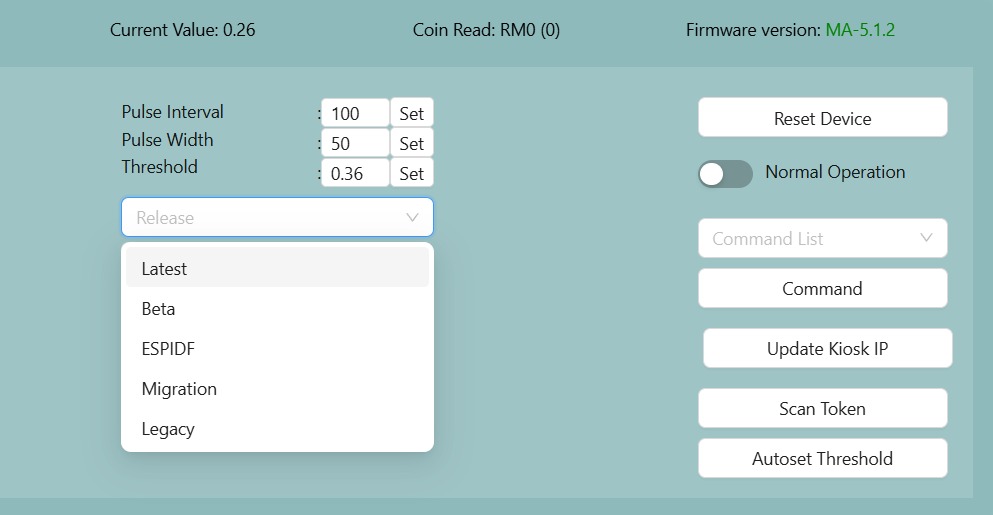
1. Initial Firmware Preparation
2. Pre-Migration Validation
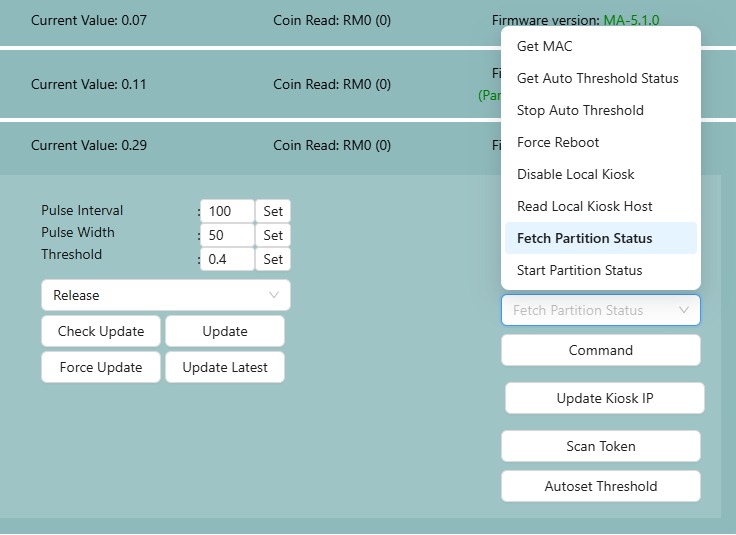
Execute the Fetch Partition Status command from the conmmand list to determine the migration state.
| Response | Action |
|---|---|
PartitionMigration_Uninitiated |
Proceed to Migration |
PartitionMigration_NotStarted |
Proceed to Migration |
PartitionMigration_Completed |
Migration not needed; skip to Phase 4 |
PartitionMigration_ErrorReadingStatus |
Stop and report issue |
PartitionMigration_Failed |
Stop and report issue |
3. Partition Migration Process
- Select Start Partition Migration from the command list and click Command.
- Observation: The device may reboot twice. Do not interrupt power during this time. The entire process may take around 2-5 minutes.
- Success Criteria: The migration is successful when
PartitionReformat_Successis published and the device reboots.
[!CAUTION] If PartitionReformat_Fail or PartitionReformat_CriticalFail is displayed, do not proceed. Report the failure immediately!
4. Final Firmware Update
- Select Latest in the Release dropdown menu.
- Click Check Update.
- When prompted with "5.X.X available", click Update.
- Verification: Following the reboot, ensure the firmware version is updated to XX-5.X.X.
If still intent to use legacy, use the legacy release (firmware version will be 4.4.11)