# 🔳 How to Get QR Codes

##### Welcome to the Laundro Portal Guide! 👋

##### Need to download QR codes for your laundry outlet? No worries! Follow this simple guide to retrieve your machine QR codes and Drop n Go Service QR code.

## 🎯 Purpose

This guide shows you how to:

- 🏪 Find your outlet in the Laundro Portal.
- 🔳 Access the outlet's QR Codes page.
- ⬇️ Download all machine QR codes.
- 📦 Download the Drop n Go Service QR code.

## 🧭 Quick Navigation

1. 🔐 Log in to Laundro Portal
2. 🏪 Open My Outlets
3. 🔳 Select QR Codes
4. ⬇️ Download All or Other
5. ✅ Verify Your Download

---

## 🔐 Step 1: Log In to Laundro Portal

1. Open the **Laundro Portal.**
2. Enter your **registered Username and Password.**
3. **Click Login.**

🔗 **Portal Login:** [https://v2.thelaundro.com/operator\_login](https://v2.thelaundro.com/operator_login)

[![WhatsApp Image 2026-05-26 at 11.30.20 AM.jpeg](https://docs.antlysis.com/uploads/images/gallery/2026-05/scaled-1680-/9zPBOmcccSQaMI94-whatsapp-image-2026-05-26-at-11-30-20-am.jpeg)](https://docs.antlysis.com/uploads/images/gallery/2026-05/scaled-1680-/9zPBOmcccSQaMI94-whatsapp-image-2026-05-26-at-11-30-20-am.jpeg)

---

## 🏪 Step 2: Open My Outlets

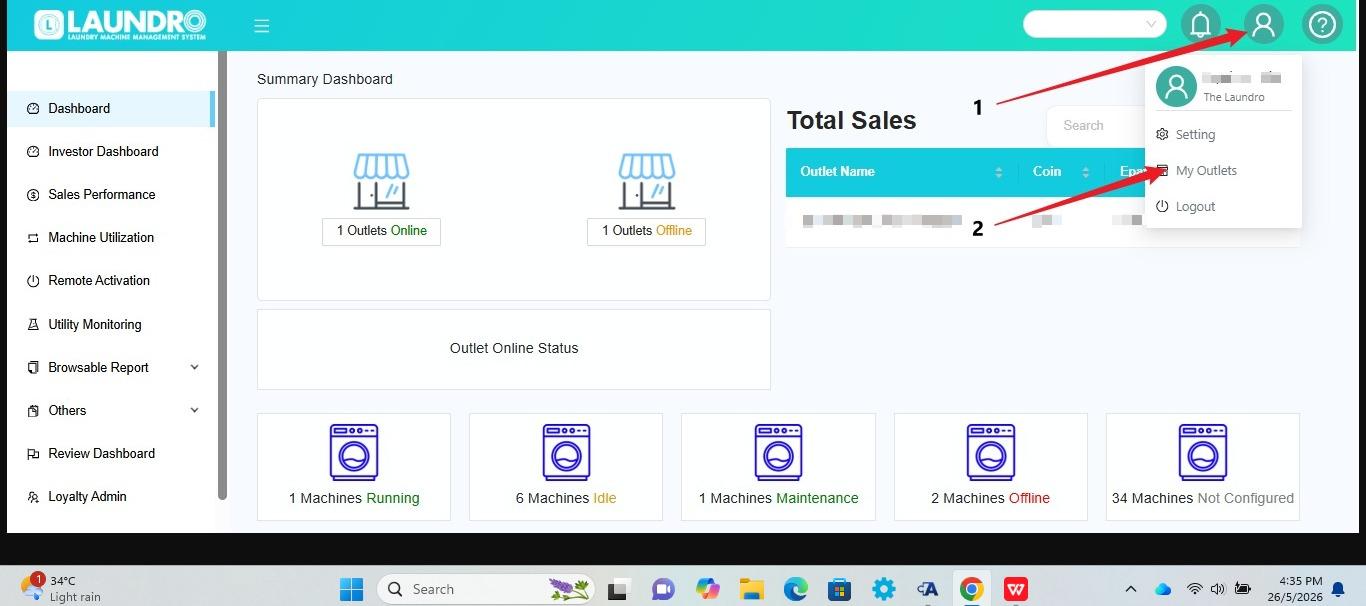
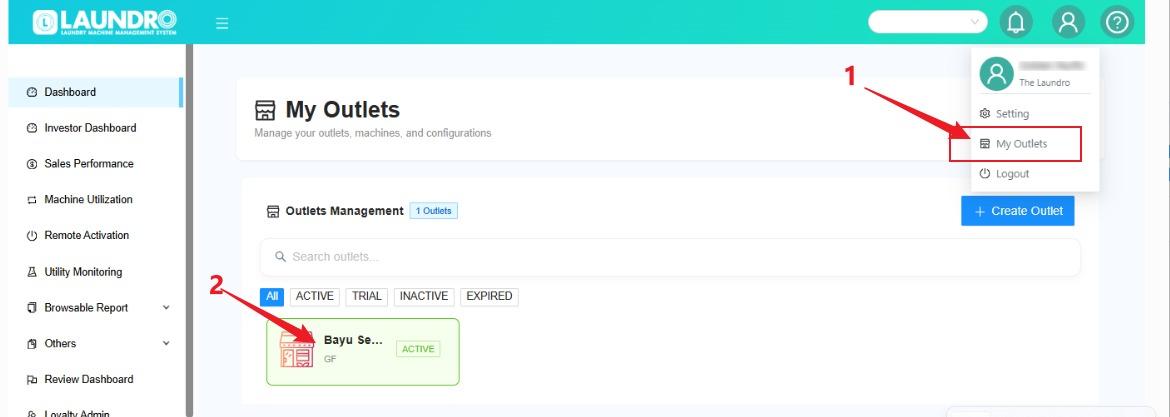
1. Click the **Profile** icon at the top-right corner of the screen.
2. Select **My Outlets** from the dropdown menu.
3. Find the outlet you want to access.
4. Click the outlet box to open its details.

<p class="callout info">💡 Tip: Make sure you select the correct outlet before proceeding.</p>

[![WhatsApp Image 2026-05-26 at 4.36.22 PM.jpeg](https://docs.antlysis.com/uploads/images/gallery/2026-05/scaled-1680-/NsI9tNwfVaSliz73-whatsapp-image-2026-05-26-at-4-36-22-pm.jpeg)](https://docs.antlysis.com/uploads/images/gallery/2026-05/scaled-1680-/NsI9tNwfVaSliz73-whatsapp-image-2026-05-26-at-4-36-22-pm.jpeg)

---

- Highlight the Profile icon and My Outlets option.
- Highlight an **outlet box** on the My Outlets page.

<p class="callout warning">💡 **Quick Tip:** Make sure you select the correct outlet before proceeding.</p>

[![WhatsApp Image 2026-05-12 at 11.55.10 AM (1).jpeg](https://docs.antlysis.com/uploads/images/gallery/2026-05/scaled-1680-/tHgrLT2mWlKV7lgQ-whatsapp-image-2026-05-12-at-11-55-10-am-1.jpeg)](https://docs.antlysis.com/uploads/images/gallery/2026-05/scaled-1680-/tHgrLT2mWlKV7lgQ-whatsapp-image-2026-05-12-at-11-55-10-am-1.jpeg)

---

## 🔳 Step 3: Open QR Codes

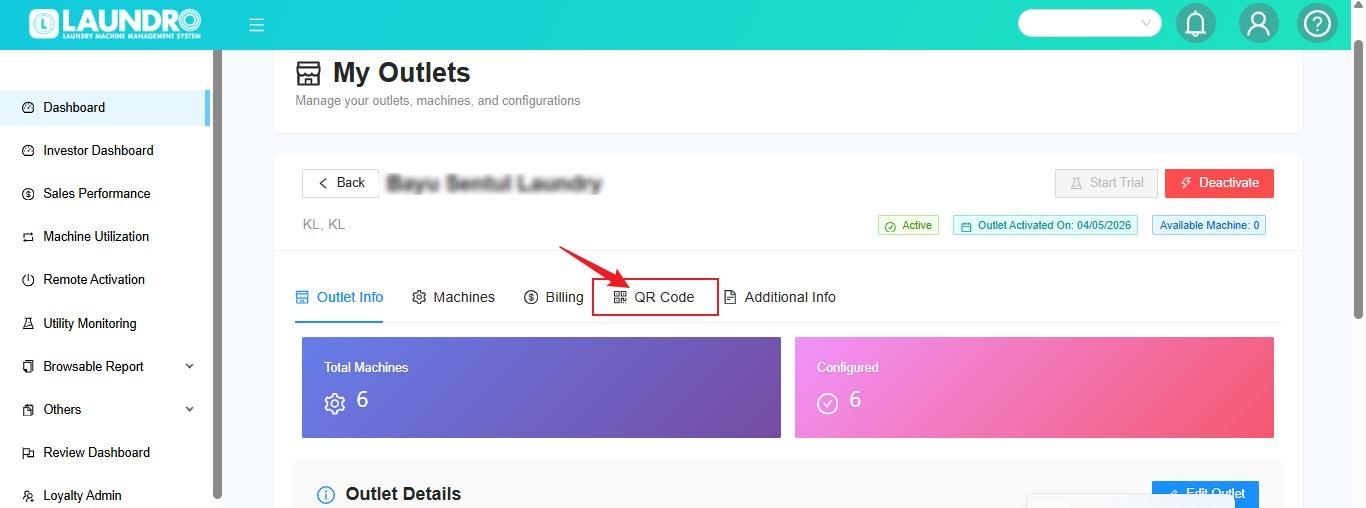
- Inside the selected outlet's details, locate QR Codes.
- **Click QR Codes** to open the QR Codes page.
- Review the available QR code options.

[![WhatsApp Image 2026-05-12 at 11.47.15 AM (1).jpeg](https://docs.antlysis.com/uploads/images/gallery/2026-05/scaled-1680-/exKxH3aqZQtlGt85-whatsapp-image-2026-05-12-at-11-47-15-am-1.jpeg)](https://docs.antlysis.com/uploads/images/gallery/2026-05/scaled-1680-/exKxH3aqZQtlGt85-whatsapp-image-2026-05-12-at-11-47-15-am-1.jpeg)
---

## ⬇️ Step 4: Download All QR Codes

##### <u>**There are two download options available:**</u>

### **Option A** – Download All Machine QR Codes

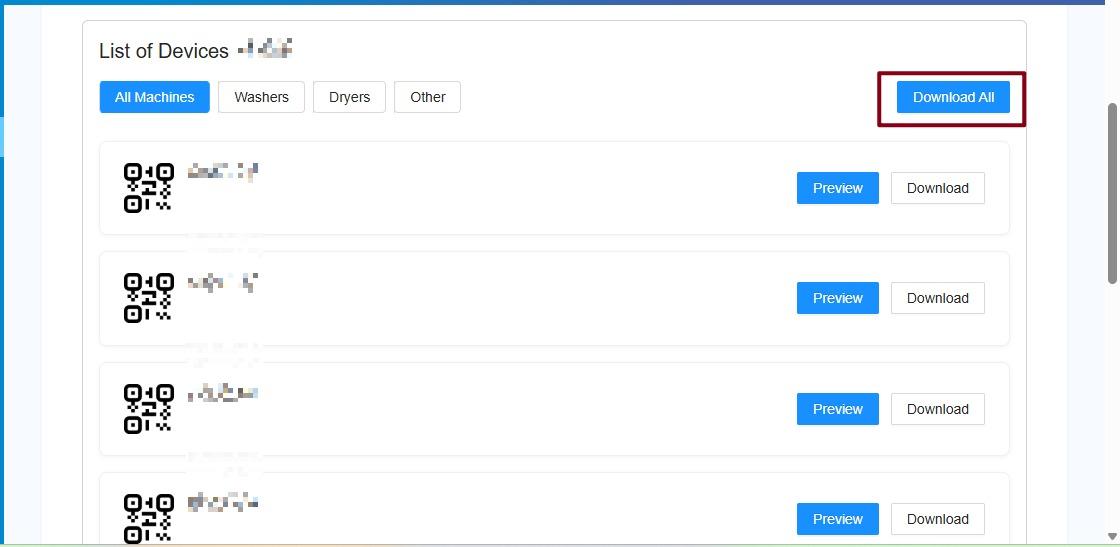
1. On the QR Codes page, **click Download All.**
2. Allow the system to generate the QR codes.
3. Check your browser's Downloads folder for the downloaded file.

[![WhatsApp Image 2026-05-12 at 11.49.42 AM (1).jpeg](https://docs.antlysis.com/uploads/images/gallery/2026-05/scaled-1680-/QpCuHvSrmt1xWuvj-whatsapp-image-2026-05-12-at-11-49-42-am-1.jpeg)](https://docs.antlysis.com/uploads/images/gallery/2026-05/scaled-1680-/QpCuHvSrmt1xWuvj-whatsapp-image-2026-05-12-at-11-49-42-am-1.jpeg)
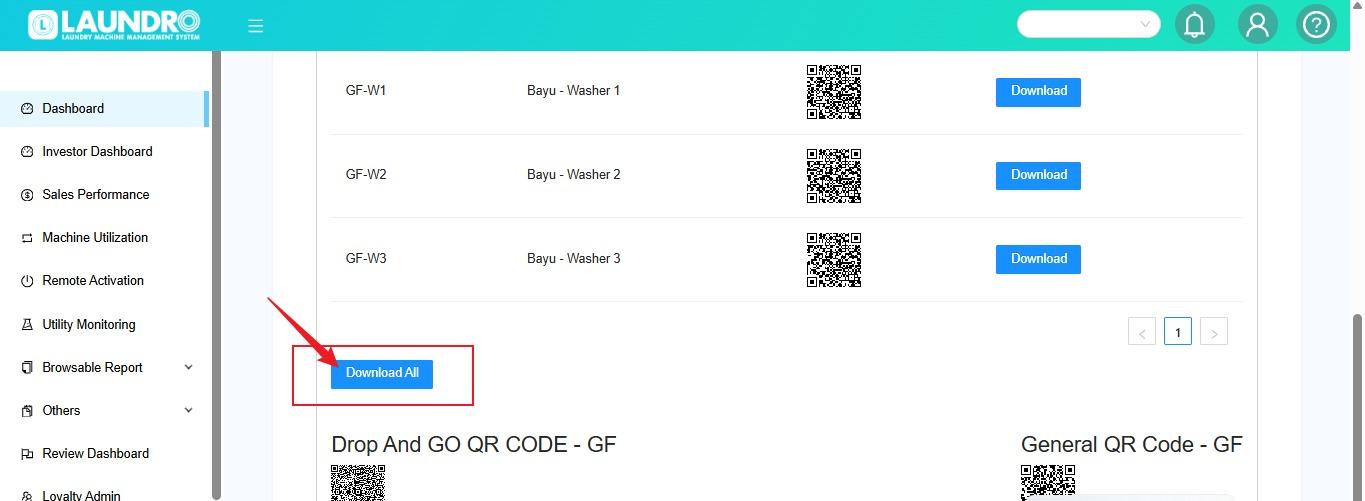
This is what our **New Page** looks like. You can click **“Download All”** to **generate and download the QR codes.**

[![WhatsApp Image 2026-08-07 at 11.24.17 AM.jpeg](https://docs.antlysis.com/uploads/images/gallery/2026-08/scaled-1680-/eAZm3mAnmJ84UdM7-whatsapp-image-2026-08-07-at-11-24-17-am.jpeg)](https://docs.antlysis.com/uploads/images/gallery/2026-08/scaled-1680-/eAZm3mAnmJ84UdM7-whatsapp-image-2026-08-07-at-11-24-17-am.jpeg)
### **Option B** – Download Drop n Go Service QR Code

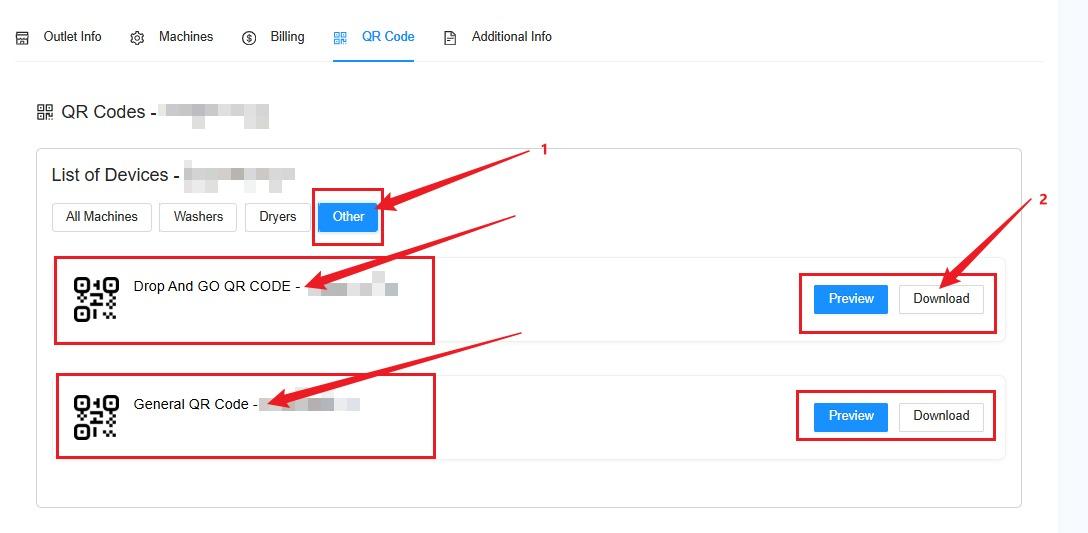
1. On the QR Codes page, locate the Other option.
2. **Click 'Other'** to download the **Drop n Go Service QR code.**
3. Check your browser's Downloads folder.

[![WhatsApp Image 2026-11-17 at 11.37.58 AM.jpeg](https://docs.antlysis.com/uploads/images/gallery/2026-11/scaled-1680-/r2dz1PDsCbLqrCxZ-whatsapp-image-2026-11-17-at-11-37-58-am.jpeg)](https://docs.antlysis.com/uploads/images/gallery/2026-11/scaled-1680-/r2dz1PDsCbLqrCxZ-whatsapp-image-2026-11-17-at-11-37-58-am.jpeg)
<p class="callout info">💡 Remember:</p>

- Download All – For downloading the outlet's machine QR codes.
- Other – For downloading the Drop n Go Service QR code.

---

## ⚠️ Important Reminders

- Always select the correct outlet.
- Check that the downloaded QR codes belong to the intended outlet.
- Make sure the QR code is clear and readable before printing.
- Keep a copy of the downloaded QR codes for future use.

## 📋 Quick Reference

<table id="bkmrk-optionpurpose"><colgroup><col></col><col></col></colgroup><tbody><tr><th>Option

</th><th>Purpose

</th></tr></tbody></table>

<table id="bkmrk-download-alldownload"><colgroup><col></col><col></col></colgroup><tbody><tr><td>Download All

</td><td>Download machine QR codes

</td></tr></tbody></table>

<table id="bkmrk-otherdownload-drop-n"><colgroup><col></col><col></col></colgroup><tbody><tr><td>Other

</td><td>Download Drop n Go Service QR code

</td></tr></tbody></table>

---

---

- 🔐 Logged in successfully
- 🏪 Selected the correct outlet
- 🔳 Opened the QR Codes page
- ⬇️ Downloaded the required QR code
- 📁 Checked the downloaded file
- 🔍 Verified the QR code before printing

## 🎉 You're Done!

🎉 You're all set! You can now use your downloaded QR codes for your laundry outlet.

If the download does not work, try again and check your browser's download settings. If the issue persists, contact Laundro Support and provide the outlet name and a screenshot of the issue.