# 🏪 How to Deactivate an Outlet

##### <span style="white-space: pre-wrap;">Welcome to the </span>**Laundro Portal Guide!**<span style="white-space: pre-wrap;"> 👋</span>

##### Need to deactivate an outlet? Follow this step-by-step guide to deactivate the correct outlet through the Laundro Portal.

## 🧭 Quick Navigation

- 🔐 Step 1: Log In to Laundro Portal
- 🏪 Step 2: Open My Outlets
- 📋 Step 3: Select the Outlet
- ⚠️ Step 4: Deactivate the Outlet
- ✅ Step 5: Confirm Deactivation

---

## 🔐 Step 1 — Log In to Laundro Portal

<span style="white-space: pre-wrap;">Open the </span>**Operator Login**<span style="white-space: pre-wrap;"> page and enter your username and password.</span>

<span style="white-space: pre-wrap;">Click </span>**Log In**<span style="white-space: pre-wrap;"> to access the portal.</span>

[![image.png](https://docs.antlysis.com/uploads/images/gallery/2026-06/scaled-1680-/5Lox6xEr0ZIGcrIV-image.png)](https://docs.antlysis.com/uploads/images/gallery/2026-06/scaled-1680-/5Lox6xEr0ZIGcrIV-image.png)

---

## 🏪 Step 2 — Open My Outlets

After logging in:

1. <span style="white-space: pre-wrap;">Click the </span>**Profile**<span style="white-space: pre-wrap;"> icon at the top-right corner.</span>
2. <span style="white-space: pre-wrap;">Select </span>**My Outlets**<span style="white-space: pre-wrap;"> from the dropdown menu.</span>
3. Wait for the My Outlets page to load.

[![image.png](https://docs.antlysis.com/uploads/images/gallery/2026-10/scaled-1680-/R4LXSmnz2ynw76ci-image.png)](https://docs.antlysis.com/uploads/images/gallery/2026-10/R4LXSmnz2ynw76ci-image.png)

<p class="callout info"><span style="white-space: pre-wrap;">💡 </span>**Quick Tip:**<span style="white-space: pre-wrap;"> Make sure you are logged in to the correct operator account.</span></p>

---

## 📋 Step 3 — Select the Outlet

<span style="white-space: pre-wrap;">On the </span>**My Outlets**<span style="white-space: pre-wrap;"> page:</span>

1. Find the outlet you want to deactivate.
2. Click the outlet to open its details.

[![WhatsApp Image 2026-08-03 at 12.59.52 PM.jpeg](https://docs.antlysis.com/uploads/images/gallery/2026-08/scaled-1680-/YkBiAemKMpZNACgW-whatsapp-image-2026-08-03-at-12-59-52-pm.jpeg)](https://docs.antlysis.com/uploads/images/gallery/2026-08/scaled-1680-/YkBiAemKMpZNACgW-whatsapp-image-2026-08-03-at-12-59-52-pm.jpeg)
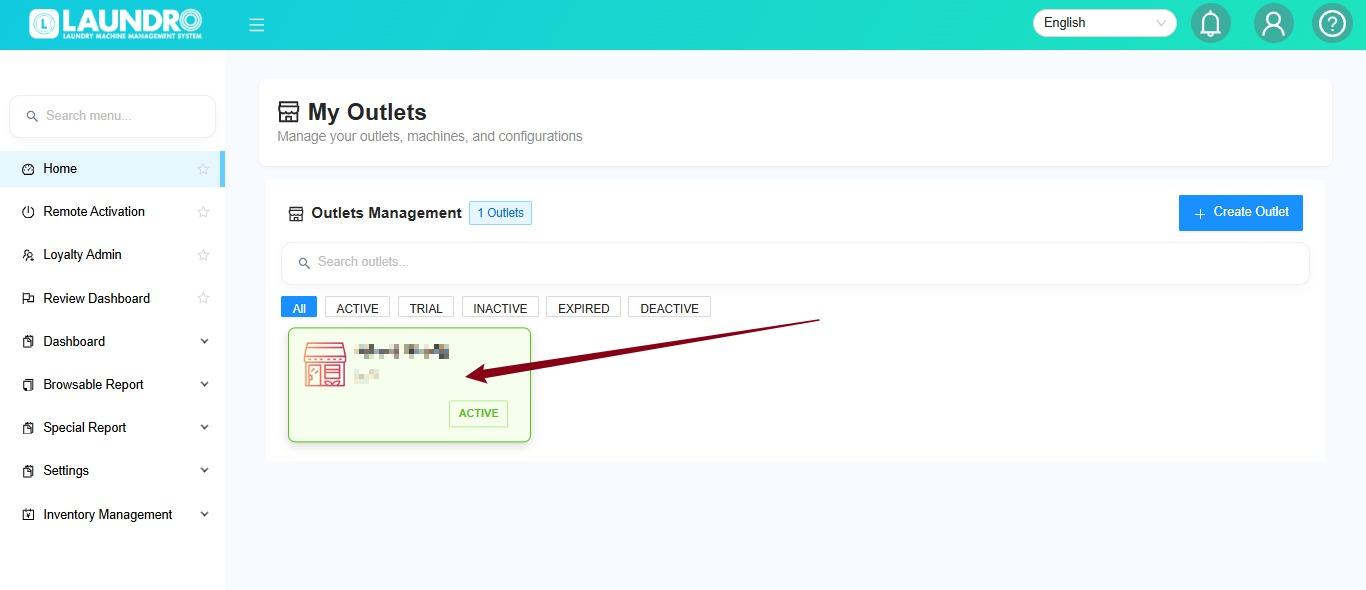
<p class="callout info"><span style="white-space: pre-wrap;">⚠️ </span>**Important:**<span style="white-space: pre-wrap;"> Double-check the outlet name before proceeding. Make sure you have selected the correct outlet.</span></p>

---

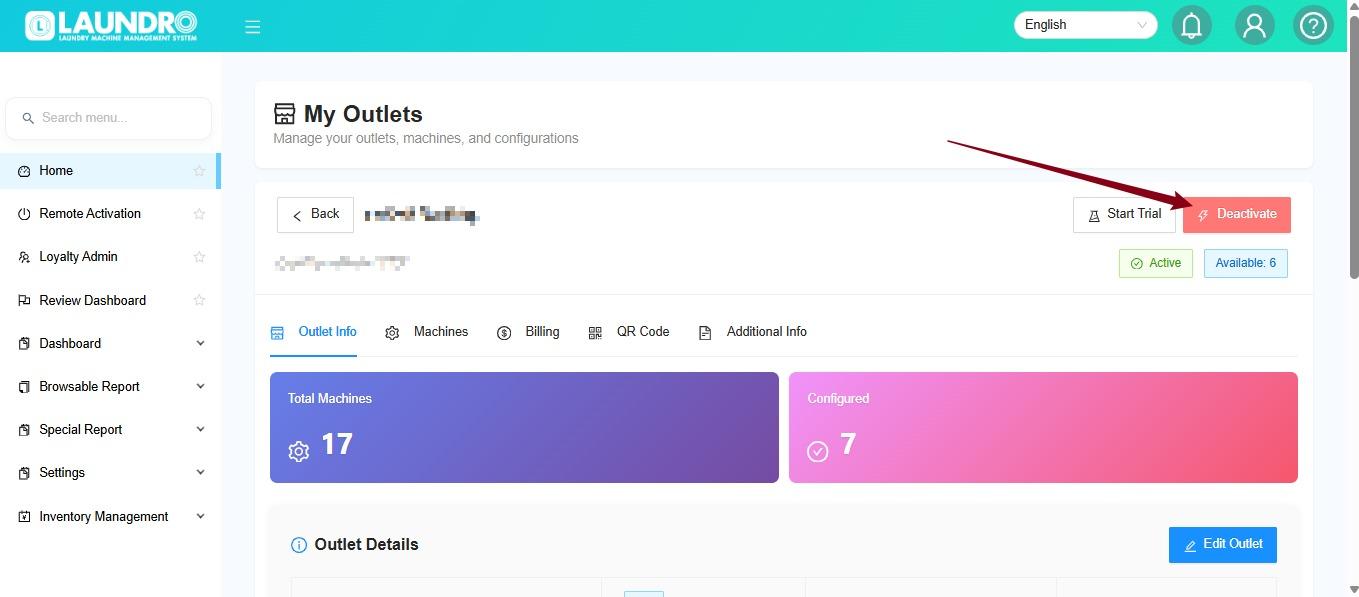
## ⚠️ Step 4 — Click Deactivate

<span style="white-space: pre-wrap;">On the selected outlet page, click </span>**Deactivate**.

[![WhatsApp Image 2026-08-03 at 1.00.59 PM.jpeg](https://docs.antlysis.com/uploads/images/gallery/2026-08/scaled-1680-/t1t1XGh84wKfDKGS-whatsapp-image-2026-08-03-at-1-00-59-pm.jpeg)](https://docs.antlysis.com/uploads/images/gallery/2026-08/scaled-1680-/t1t1XGh84wKfDKGS-whatsapp-image-2026-08-03-at-1-00-59-pm.jpeg)

<p class="callout info"><span style="white-space: pre-wrap;">💡 </span>**Before proceeding:**<span style="white-space: pre-wrap;"> Make sure you intend to deactivate this outlet. Check with the relevant person in charge if you are unsure.</span></p>

---

## 🔴 Step 5 — Confirm Deactivation

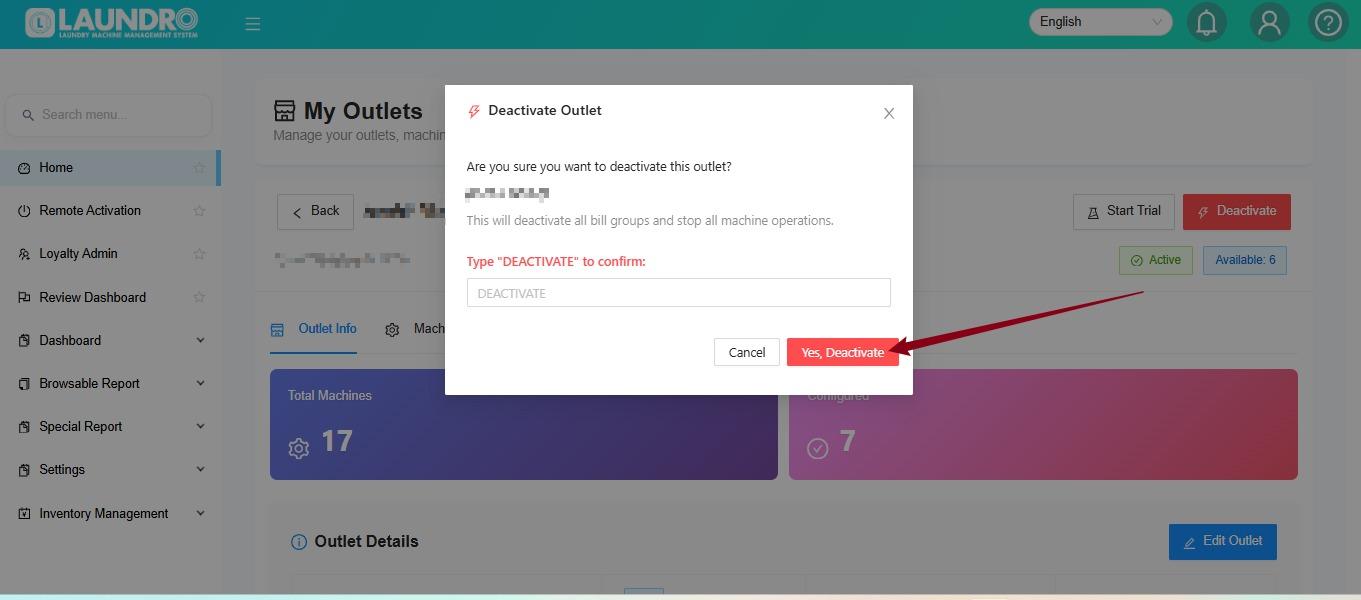
A confirmation prompt will appear.

1. Review the confirmation prompt.
2. <span style="white-space: pre-wrap;">If you are sure you want to proceed, click </span>**Yes, Deactivate**.

[![WhatsApp Image 2026-08-03 at 1.02.01 PM.jpeg](https://docs.antlysis.com/uploads/images/gallery/2026-08/scaled-1680-/tg2GyrSFqU8F3EQk-whatsapp-image-2026-08-03-at-1-02-01-pm.jpeg)](https://docs.antlysis.com/uploads/images/gallery/2026-08/scaled-1680-/tg2GyrSFqU8F3EQk-whatsapp-image-2026-08-03-at-1-02-01-pm.jpeg)

<p class="callout info"><span style="white-space: pre-wrap;">⚠️ </span>**Important Reminder:**<span style="white-space: pre-wrap;"> Deactivation may affect the outlet's availability or operations. Confirm the intended action before proceeding.</span></p>

<span style="white-space: pre-wrap;">🎉 </span>**You're all set!**

You have completed the outlet deactivation steps. Check the outlet status in the portal to verify the result.

<p class="callout success">**Need help?**<span style="white-space: pre-wrap;"> Contact the Laundro support team if you encounter an issue during deactivation.</span></p>