📊 Costing & Sales Report
Welcome to the Laundro Portal Guide! 👋
Want to review your Costing & Sales report? Follow this guide to select your filters, generate the report, and review the total based on your selected criteria.
Purpose
The Costing & Sales report allows you to view costing and sales information based on the selected Operator, Month, and Outlet.
How to Access
📍 Step 1 — Open Costing & Sales
Log in to the Laundro Portal using your operator account and navigate to the Costing & Sales report page.
- Log in to the Laundro Portal using your Username and Password.
🔗 Portal Login: https://v2.thelaundro.com/operator_login
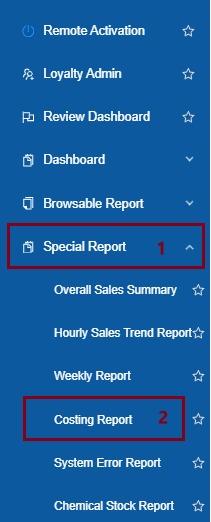
💡 Tip: Make sure you are using the correct operator account before generating the report.
🔎 Step 2 — Select the Operator
Choose the required Operator from the filter.
This determines which operator's report you want to view.
📅 Step 3 — Select the Month
Choose the month you want to review.
💡 Example: Select September to review the report for September.
📸 Insert Screenshot 3: Month filter highlighted.
🏪 Step 4 — Select the Outlet
Choose the required Outlet from the filter.
Make sure you select the correct outlet for the report you want to generate.
📸 Insert Screenshot 4: Outlet filter highlighted.
📊 Step 5 — Generate the Report
Ready to view your results?
- Review your selected Operator, Month, and Outlet.
- Click Submit.
- Wait for the report to load.
- Review the report details and the displayed Total.
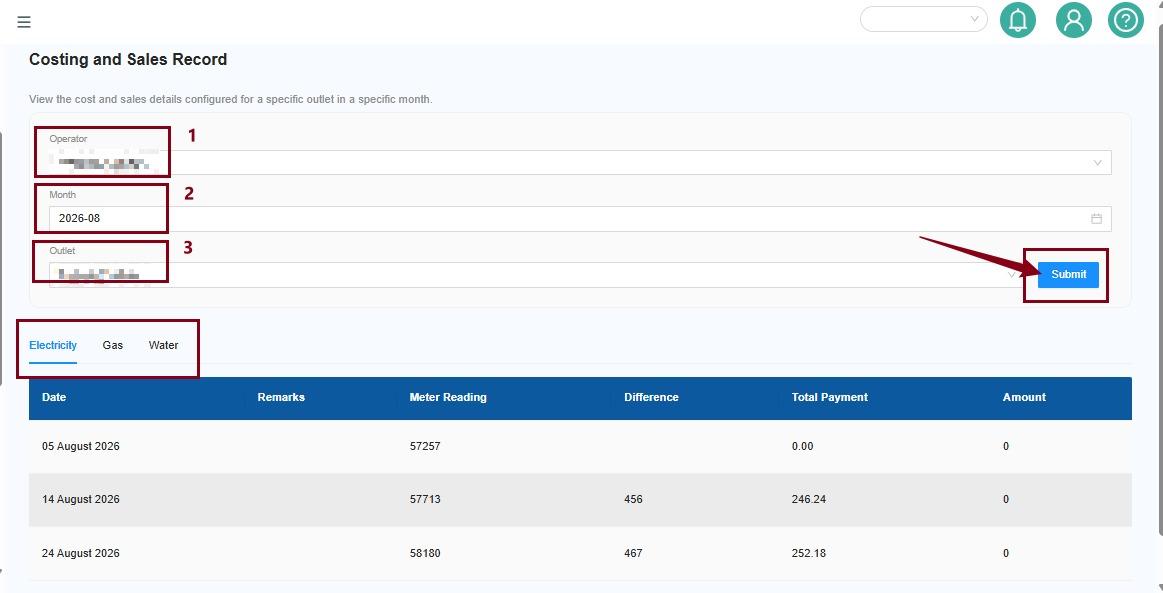
🧮 Understanding the Report Total
The report displays a Total based on the selected filters.
Before reviewing the results, check that you have selected the correct:
- 👤 Operator
- 📅 Month
- 🏪 Outlet
These filters determine which report data is displayed.
💡 Quick Tip: If the results do not look correct, check your filters and click Submit again.
⚠️ Troubleshooting Tips
The report shows unexpected results
Check whether the correct Operator, Month, and Outlet have been selected.
The report does not show the expected data
Review your filters and click Submit again. If the issue persists, contact the Laundro support team for assistance.
✅ You're All Set!
You now know how to generate and review the Costing & Sales report.
Before finishing, remember to:
- Select the correct Operator.
- Choose the required Month.
- Select the correct Outlet.
- Click Submit.
- Review the report details and Total.