# Steps for Installation on Detergent machine
1. **Wi-Fi Setup :**
A.Ensure Wi-Fi is ready with a strong signal to support the Alpha1 device.
B. 2.4GHz is recommended.
2. **Device Placement :**
A. Place the Alpha1 device as shown in Picture 1.
b. You may place it elsewhere, but ensure it is safe and secure.
3. **Connect Positive + & Negative - From Device to Power Supply :**
4. **Power Connection**
A.Power the device using the power supply & connect it to 12V
[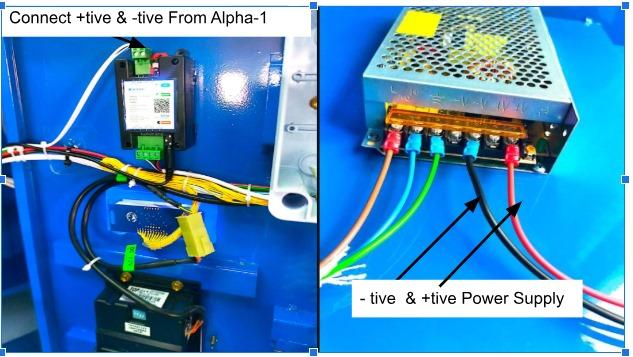](https://docs.antlysis.com/uploads/images/gallery/2025-08/odlSCk9yy412IKKq-whatsapp-image-2025-08-15-at-12-48-27-pm.jpeg)
[](https://docs.antlysis.com/uploads/images/gallery/2025-08/PSKNpSr2oKWwWAuj-whatsapp-image-2025-08-15-at-2-19-00-pm.jpeg)
5. **Cable Connection**
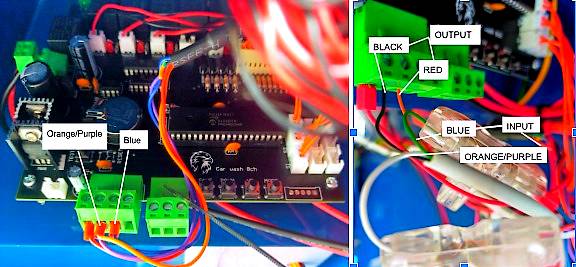
A. Disconnect both cables from the board (Orange/Purple & Blue).
B. Use a 4-core cable to connect the input and output.
C. Output Cable: Connect Black & Red to the Motherboard.
D. Input Cable: Connect Green to Blue and White to Orange/Purple.